
Daily Tasks
- Check Voicemail and Text for Cancellations
- Review confirmation status in list view
- Check 1-2 days ahead for completed questionnaires
- Check Insurance Eligibility
- Onboard/Screen New Patients
- Provider Schedule Maintenance
- Review Inbound faxes
Check Voicemail for Cancellations
Check missed calls and texts in Dialpad for cancellations and other requests/questions.
Check for Complete Questionnaires
- Check for completed questionnaires for new patients a few days ahead of their scheduled appointment. If not complete, reach out via phone, text, charm message or a combination of methods. Document each attempt to reach out.
- If no forms filled 24 hours before appointment, cancel appt and fill with alternate patient
Check Eligibility
Eligibility and Benefits should be checked 1-2 days prior to a patent’s appointment. Checking eligibilty in Charm is straight forward. See: Charm eligibility
- Check eligibility in Charm or via payer portal
Real Time Eligibility
Charm will automatically perform Eligibility Inquiry for scheduled patient appointments.The Eligibility Inquiry will be done only for the patient’s primary insurance. The information retrieved, such as Insurance Eligibility Status, Copay, Deductible, Co-Insurance, and Policy Validity Dates, will then be updated to the Patient’s Insurance.
To get a better view of eligibility in addition to relying on the auto E&B checks, the Eligibility Inquiry Report should be reviewed each day. This can be found by visiting: Billing > Reports > Other Reports >> Eligibility Inquiry Report
This report shows Insurance Eligibility Status as either “Eligible”, or “Not Eligible”. Patients showing as “Not Eligible” need to have further investigation done.
Copay/Balance Collection
- In list view, you can see if a patient has a copay amount listed
- If they have a card on file (they should), payment can be collected from list view.
Check inbound Faxes
- Referrals
- Release of Information
- Records Requests
- Pharmacy Requests
- I use these requests as a reminder to check the patient chart to see if they are still active with us. If so, I will send them info on how to request a refill via the patient portal which explains why we ignore pharmacy requests. See below:
- Check to see if they are active (appt within past 3-6 months), what meds have been recently eRx and with how many refills (if any), messages or “other messages” to see if patient has had recent communication with provider about the Rx(s) in question.
To request a medication refill, visit tulsafamilypsychiatry.com/portal/
Once logged In, click “medications”, find the medication you are requesting a refill on and click “Refill Request”. A window will appear allowing you to enter additional comments which your provider will see.
Although you are probably familiar with the process of requesting a refill though your pharmacy, often they have been known to send automatic requests for medications to be refilled even when you have not requested a refill. To combat against this, we do not respond to automated refill requests from pharmacies.
Thank you for understanding.
Regards,
Patient Intake
New Patient Forms List
New – Clinic – Adult
- (TF) – ATTENDANCE POLICY
- (TF) – CONSENT TO TREAT/ASSIGNMENT OF BENEFITS/ RELEASE OF INFORMATION/HIPAA/ATTENDANCE
- (TF) – Covid-19 Patient Self-reported Screener
- (TF) – Credit Card Authorization Form
- (TF) – HIPAA Privacy
- (TF) – New Patient – Adult
- (TF) – Outside lab
- (TF) – Photo ID and Chart Picture
New – Clinic – Child
(All the same forms as above with these additional forms which are specific to children)
- (TF) – New Patient – Child
- (TF) – SCARED – Parent Questionnaire
New – Telemed – Adult & New – Telemed – Child
(All the same forms as above with these additional forms which are specific to telemed)
- (TF) – Dr. Herring/Vaden/Sarah/Ashley – Doxy Link
- (TF) – Telemedicine Consent
- (TF) – Telemedicine Success
Attendance Tracking
Use a Red sticky to document last minute cancellations and No Show appointments.
Refer to the Attendance Policy for specifics.
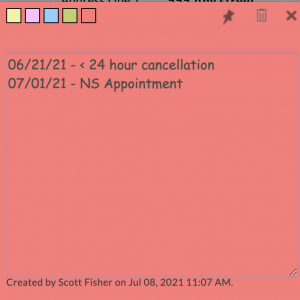
No Show and Late Cancel (< 24-Hour Notice)
- Provider will typically mark the patient a No Show if more than 7-10 mins from their appointment time has passed.
- To document, enter details of the NS or Late cancel in a red sticky note as above. Note any info that might be important for future reference.
- Send a PHR message to patient using aText with the “noshowM” script.
- Generate an invoice (all except Medicaid/SoonerSelect) for the NS/Late Cancel fee
- Send the invoice to PHR/email
- Wait to closer to end of day to process the charge. This will allow them to call in with a potential valid excuse. We will sometimes make an exception for a true emergency or other similar situation. If the decision is unclear, please see the Office Manager or Scott.
Labs
We use DLO/Quest for our lab orders which our providers can send electronically. Results then come back into our system for review by the ordering provider.
Policy on Outside Labs
(TF) – Outside labI understand that Tulsa Family Psychiatry orders lab testing via DLO/Quest Diagnostics. While I am not required to use DLO/Quest for my labs, if I elect to use an outside laboratory I will be responsible for a $25 administrative fee to import lab results into my patient record. This fee is not billable to insurance.*
Reviewing Lab Orders
Lab orders can be viewed from the left sidebar you click > Lab Records > Lab Orders Tab and you should see any ordered labs.
Clicking the 3 dot menu will allow you to:
- Print Lab Order
- Export as PDF
- Share to PHR (portal)
- Share by Text (They get a notice there is an order that has been shared)
- Specimen Details
- Print Specimen Label
- Mark as Completed
- Mark as Expired
- Delete Order