
Processing inbound referrals encompasses several key steps. The highest source of referrals are from self-referral. We also receive referrals from individual providers and healthcare organizations.
Referral Received
- Download referral from HumbleFax
- Save into: /FAXES/Referrals
- File name format: LastName FirstName.pdf
Create Patient in Charm
- Create new patient record (or confirm existing).
- Enter full demographics
- Care Team: Add the referring provider
- Upload the referral PDF into the chart:
- Category: Referral
- Update Patient Category in Charm to: REFERRAL IN
Move Document to Processed Folder
After the referral is fully entered into Charm:
- Move the PDF to: /FAXES/Referrals/Processed
- This keeps the inbound queue clean and prevents duplication.
Determine Initial Eligibility & Clinical Fit
A brief review at this stage helps us flag any immediate concerns before moving the patient to the NPI step, even though a full evaluation will occur once we have both the referral details and the completed New Patient Interest form.
Check:
- Insurance accepted?
- Service appropriate for TFAM?
- HLOC (Higher Level of Care) required?
- Age/provider match?
If yes to all, move to next step below
Contact the Patient or Caregiver
Attempt phone outreach:
Phone Script:
“Hi, this is TFAM calling about a referral we received for [Patient Name] from [Referring Provider].
I’m calling to answer any questions and explain our next step, which is completing the New Patient Intake (NPI) form.
We can send the link to you by text or email, or you can find it on our website at TulsaFamilyPsychiatry.com/new.”
If patient answers:
- Ask whether they’d like the NPI link via SMS, email, or if they prefer navigating to the website themselves.
- Send the NPI link immediately.
If voicemail:
- Leave brief VM with purpose of call.
- Immediately send Dialpad SMS using aText shortcut “refnpi.atext”.
Hi, this is Tulsa Family Psychiatry & Wellness. We received your referral—please complete our new patient interest form at https://tulsafamilypsychiatry.com/new. Thank you! (Reply STOP to opt-out)
Documenting Contact Attempts
- Add a Quick Note summarizing outreach and disposition
- Called LVM, sent SMS with link, deactivating.
- Deactivate the chart
- Chart deactivation removes them from the pending referral list and keeps the pipeline clean.
- If they later call back, the chart is quickly reactivated.
Workflow: Referral Missing Contact Information
- Search Charm for possible match by DOB/Name
- If no match, contact referring provider
- Fax or call referring provider’s office
- “We received the referral but lacks patient contact information. Please resend with complete information.”
- Move PDF to: /FAXES/Referrals/Missing Info
Workflow: Referral for a Patient We Cannot Take
Reasons we cannot accept:
- Insurance not accepted
- Referral requires higher level of care (IOP, residential, acute psychiatry, etc.)
- Service not offered (ex: neuropsyche testing, mandated evaluations)
- Capacity/clinical appropriateness concerns
Notify the referring provider
“Referral received for [Patient Name].
Unfortunately TFAM is unable to accept due to [reason].
Referral closed. Please redirect as appropriate.”
- Note in Quick Notes, deactivate chart
Pending Referrals in Charm
Purpose: Maintain a clean, accurate list of patients who are actively moving through the referral pipeline.
Referrals will exist in Charm with the patient category “REFERRAL IN” until they move into the NPI stage. All other status updates should be documented in Quick Notes.
An active list of referrals in Charm can be generated following these steps:
- Left side bar → Analytics > Custom Reports >
- Patient Statistics > Patient Category – Enter “REFERRAL IN”
- Default patient state will be “Active”
- Click orange Generate button to generate the list
- This should represent referrals in the system that have not moved into the New Patient Interest step of intake.
Adding a Referring Provider In Charm
From patient chart > Left Side Bar > Patient Details > Care Team > Referring Provider
- Begin typing first or last name of the referring provider.
- When the name appears, click it to select
- If there is no matching provider, click the orange “Add New Provider” button to launch a data entry window.
- It is essential we have a complete record, so please be sure we capture the following fields:
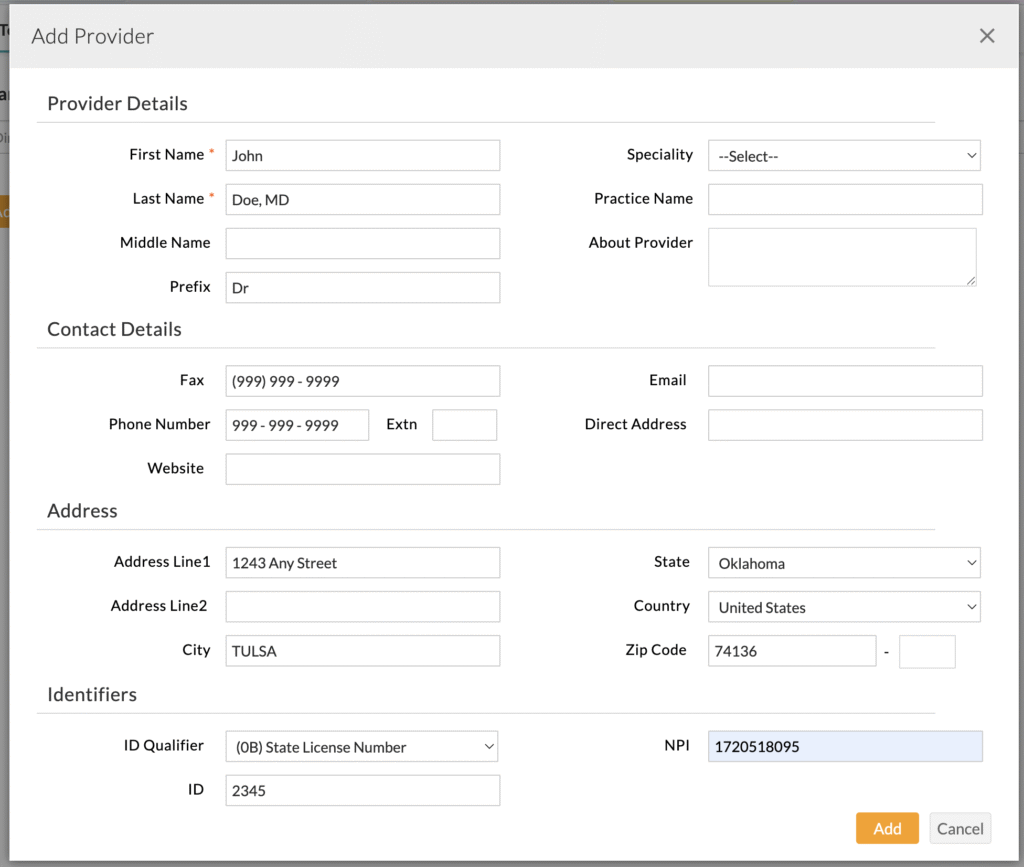
The referring provider data is important for two main reasons:
- It helps us keep track of who is referring to our practice
- The referring provider information goes out on claim forms and has the most direct impact for SoonerCare (SoonerSelect, OHCA) claims. If the referring provider NPI data is wrong, the claim will be rejected.